Configuring OAUTH Authentication
Orchestra has the capability to utilize the OpenID protocol for the login process. OpenID is an open, decentralized protocol for internet authentication, allowing users to sign in to multiple websites using a single identity. It employs the concept of single sign-on, enabling a user to gain access to multiple services after a single authentication. OpenID uses URLs as identifiers and allows users to verify their identity through OpenID providers. OpenID extends the OAuth protocol and is implemented by Orchestra. In the further documentation, the term OAuth will be used more frequently, as it is the more commonly recognized name and often used synonymously with OpenID.
Difference between OAuth and OpenID
OAuth and OpenID are two distinct protocols commonly used together to enable authentication and authorization in web applications.
-
OAuth is an authorization protocol that allows an application to access resources on behalf of a user without needing to know the user's password. It facilitates secure and standardized authorization between different services.
-
OpenID is an authentication protocol that lets a user sign in to a website or application using their existing credentials, avoiding the need to create a new user account. It enables the use of a single identity (Single Sign-On) across different services.
OAuth focuses on granting access to protected resources, while OpenID emphasizes verifying the user's identity. Together, OAuth and OpenID provide a comprehensive solution for both authorization and authentication, ensuring secure access to resources while simplifying the user experience across multiple services.
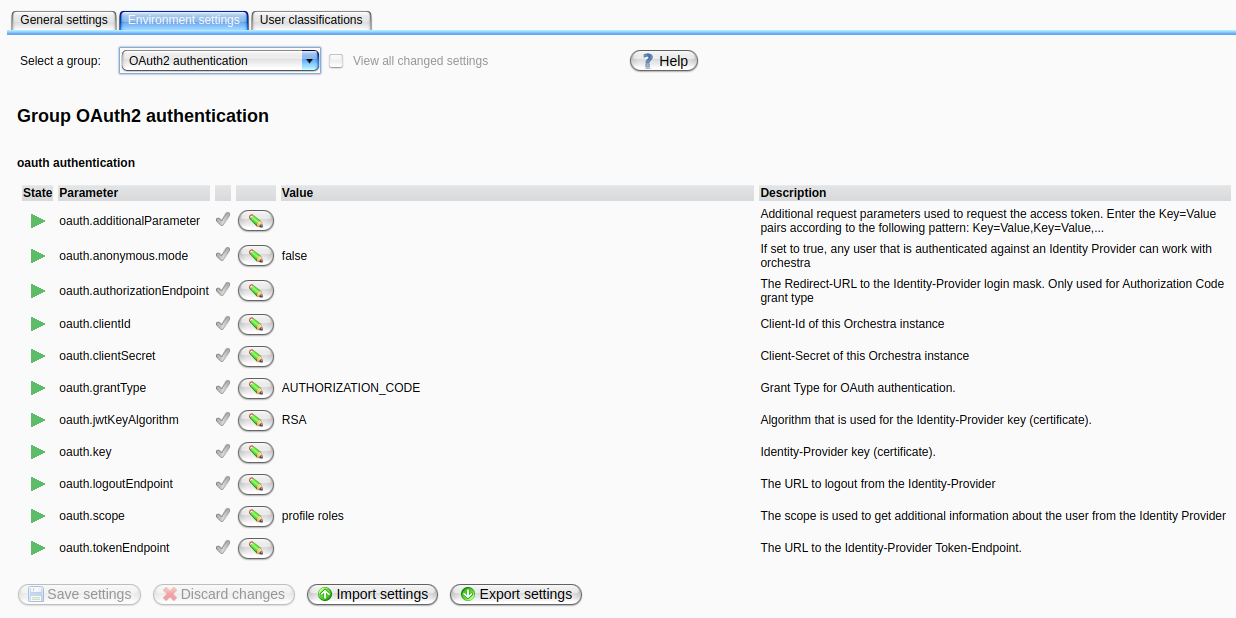
| Attribute | Description |
|---|---|
oauth.anonymous.mode | Set to true to activate OAuth/OpenID authentication. Once this parameter is set to true, the login process will switch to OAuth authentication. Orchestra will attempt to authenticate the user against the configured Identity Provider. |
oauth.authorizationEndpoint | The URL to your Identity Provider's Authentication Endpoint. The URL may vary depending on your Identity Provider. Refer to the documentation of your Identity Provider for details on how to acquire the Authentication Endpoint URL. |
auth.clientId | The Client-ID identifies your Orchestra application to your Identity Provider. While it is public, it should not be easily guessable. |
oauth.clientSecret | The Client-Secret is a secret known only to your application and the authorization server. It acts as Orchestra's password for the authorization server and should be treated with care. Do not store this secret locally or share it with others. |
oauth.grantType | The Grant Type defines the actual OAuth flow. Orchestra supports two different flows: 1. PASSWORD (legacy): In this flow, the user enters their credentials in the Orchestra login form. These credentials are forwarded to the authorization server, which returns a JWT-Token upon user permission. This Grant Type is not recommended due to its vulnerabilities.2. AUTHORIZATION_CODE: In this flow, the user is redirected to the Identity Provider's login form; upon credential entry and permission granting, the authorization server redirects back to Orchestra with the authorization code. Orchestra then exchanges this code for a JWT-Token to log the user in. This is the recommended grant type. |
oauth.jwtKeyAlgorithm | The algorithm used by the authorization server to sign the JWT-Token, ensuring that the JWT-Token is issued by your authorization server and not from a malicious source. Set this to the algorithm used by your Identity Provider. |
oauth.key | The public key provided by your authorization server to encrypt the signed token. Refer to your Identity Provider documentation to obtain this key. |
oauth.logoutEndpoint | The URL for the logout endpoint of the authorization server. This endpoint logs the user out at the Identity Provider and invalidates the active token. Refer to your Identity Provider documentation for information on how to acquire the logout endpoint URL. |
oauth.scope | The scope/claim used to request permission to access user data. Add a role claim/scope to this configuration to map the Identity Provider's roles to the Orchestra role system. |
oauth.tokenEndpoint | The endpoint used to request a new token once the current one becomes invalid due to expiration. As long as the user is logged in, Orchestra will request a new token using the attached refresh token. |
oauth.additionalParameter | Additional request parameters used to request the access code. These are specified as Key=Value pairs (e.g., Key=Value,Key=Value). These parameters are relevant for the code request, but not for the token request if the Identity Provider requires further information. |
Orchestra OAuth-Servlets
In the OAuth authentication flow, Orchestra acts as the client and therefore needs to provide two servlets. These servlets facilitate the sending and receiving of requests, and their URLs are necessary for proper IP configuration.
Note: * represents the Orchestra Monitor URL (e.g., http://localhost:8090/monitor).
| URL | Description |
|---|---|
*/oauth | This URL is used to send the code request to the Identity Provider (IP). |
*/oauth/callback | This URL serves as the callback endpoint for receiving the authorization code from the IP and requesting the JWT afterward. |
Note: * represents the Orchestra Monitor URL (e.g., http://localhost:8090/monitor).
Configuration of the security_settings.xml
The security_settings.xml file is used to define your Orchestra role mapping. See Configuring OAUTH role mapping for specific documentation.